Mirage2FA
- 39
- Global rank
- 21
- Month rank
- 51
- Week rank
Mirage2FA is a Phishing-as-a-Service toolkit designed to compromise Microsoft 365 accounts and bypass conventional MFA through Adversary-in-the-Middle attacks. It uses malicious HTML, XHTML, and SVG files to deliver JavaScript loaders that connect victims to attacker-controlled phishing infrastructure. The toolkit relays authentication in real time, capturing credentials, 2FA codes, and authenticated session cookies. It also uses browser fingerprinting, WebSockets, obfuscation, and rotating infrastructure to evade detection and maintain access to compromised accounts.
- Phishingkit
- Type
- LinX Coders
- Origin
- 23 September, 2024
- First seen
- 19 October, 2026
- Last seen
How to analyze Mirage2FA with ANY.RUN
IOCs
IP addresses
- 40.126.31.69
- 150.171.27.11
- 74.125.250.129
- 185.174.100.90
- 92.122.215.99
- 149.248.8.148
- 48.209.6.48
- 23.59.18.102
- 150.171.109.104
- 150.171.109.101
- 48.209.133.15
- 162.159.207.0
- 2.23.246.9
- 2.16.204.135
- 20.190.160.2
- 150.171.109.107
- 199.232.214.172
- 104.18.95.41
- 142.251.14.94
- 184.168.103.87
Hashes
- 7ed5365e98f6530bd363b38af5db470455a80bd52e832917c4c68dbea868d362
- 771f5d16a9ccd5e1377ba482c85a62c15881a7322469f5c7c6931d4672c30063
- dafe5eccc014dc254ad8af0e7b83c9b54a3d8e70e958e5e5006db28f43687fcd
- 12439fc3368bd6afc72a74d96f8bdce42aea88e9b279591fae40292e6ad6bc1d
- 7989b469792bcad6dbf9ccfd52cbb2a8a49c39894c9c3445f972ce9804c367e2
- 9bb536963d82478d7696f982d8394a5ec37566237ddeefc3515c15f98df74a6a
- 6831bddbeca4c9f12444b531f42a37d2edaef2d32882311c5430fcdbef2bfe1d
- b1d95b0173b15eab983f83871fa0676a65a01cb8141dd990be9e62372624b88d
- 78512a62c57136f33f6b8446b14e92b1086275450a4f40c253c029e81e684bf8
- 18075576bfb9f1a312df482b69d71e05b2a749dbb2afaed4d1ef8e0026701690
- 574b444aca0153b93bb3759a2dfb6e9d6ca915a053bcde7bece9aaf54585e608
- 8d952bb07dea466100442fe5f86347ff054ce19b7ac35586e6c3e3b81b954365
- 9a3086219a6a5f86c72fad32dcd3105e1ad16d35c07c2fe10b2b04ba9b99064f
- 139ff3669272c9d4d24ad41b74823837e7a64e98b5fcb33450f910e3979f048c
- f7bc143d21895a88825c3f6a4b4cd4c23ad890b824bedf2a894a06e61c5da396
- c43eee23fa9243a5facb130425c8f57eed504d1bedcd49d1c4f621885695e0b4
- 269b3a43ad6cb11d80319383b1b4640e97bb042a80dea8b8061c6824f898cab6
- 266da3069a00ae9193ac11ae63771f5aeefa18b1862a441e03d319fde7bc1680
- 84c21f338d0339521cb2974fa435ccde7034ba57732a7b6f5ae2d698a709d289
- a7ee799dd5b6f6dbb70b043b766362a6724e71458f9839306c995f06b218c2f8
Domains
- vertexbase51.lat
- google.com
- fonts.googleapis.com
- edge.microsoft.com
- stun1.l.google.com
- msedge.b.tlu.dl.delivery.mp.microsoft.com
- stun.l.google.com
- challenges.cloudflare.com
- graciousorganic.com
- login.microsoftonline.com
- fonts.gstatic.com
- vxc.cheacker.store
- www.bing.com
- xpaywalletcdn.azureedge.net
- www.microsoft.com
- crl.microsoft.com
- stun.cloudflare.com
- edge-cloud-resource-static.azureedge.net
- go.microsoft.com
- settings-win.data.microsoft.com
URLs
- http://crl.microsoft.com/pki/crl/products/microoceraut2011_2011_03_22.crl
- http://www.microsoft.com/pkiops/crl/microsoft%20secure%20server%20ca%202026.crl
- http://msedge.b.tlu.dl.delivery.mp.microsoft.com/filestreamingservice/files/fef489f0-c0aa-4886-ba2b-137e93d55624?p1=1792758905&p2=404&p3=2&p4=lgojm4v2ehbcwcfaulleoibigf5yph4afnmpc%2b7v9jb3eqsdjcrhrkshzzk4wnhykgvrhtdzjur3n97dbdgydq%3d%3d
- http://msedge.b.tlu.dl.delivery.mp.microsoft.com/filestreamingservice/files/8f5fc415-8647-4b85-a913-4f863dae87ab?p1=1792755305&p2=404&p3=2&p4=bqygisk8i7%2bepvdogcjkuasurys8cvfnhbjzukdqm4tbe6akvbdydtjhjpbir09rqbyrj3rt98yn81pvcoitoq%3d%3d
- http://msedge.b.tlu.dl.delivery.mp.microsoft.com/filestreamingservice/files/5087cff5-02d3-45cf-aeeb-a5ea284d97f8?p1=1792456027&p2=404&p3=2&p4=snpvvwzosifo4xq34ib5zzvbvqqi7vobm7rcij0m2ajcbht%2f5uz1gsbfpzb5m%2b6hytcpn%2bzfinabqzhd74rm7w%3d%3d
- http://msedge.b.tlu.dl.delivery.mp.microsoft.com/filestreamingservice/files/550117a4-8c0f-4d0d-8ff8-7c3caccb0e8a?p1=1792755305&p2=404&p3=2&p4=fa0b%2fbsacdczzfswn7ajmudrylgyotbavihpayzmeqfwrzjsnf66rgsupo6lwrprmum8dwq6gzotawzh5ndsiq%3d%3d
- http://msedge.b.tlu.dl.delivery.mp.microsoft.com/filestreamingservice/files/dc29377b-f768-4c2c-8ebc-9656a0029560?p1=1792517948&p2=404&p3=2&p4=fvtraf4t9rjtx272829xxrwhf%2fdyk%2bem9x4hzssvmjmvrccvotav2x3zebliqb383ino2ncknwvdgobsuprqkw%3d%3d
- http://msedge.b.tlu.dl.delivery.mp.microsoft.com/filestreamingservice/files/86061e48-63b3-483f-8dac-609df0cbb238?p1=1792758905&p2=404&p3=2&p4=ol33hcptxkzg3oev7bydi%2flvwbqio6u6suopzikkdtqlzwxfpwzcp1krufgyso29vwankuchmyugyb%2bjtvls7a%3d%3d
- http://msedge.b.tlu.dl.delivery.mp.microsoft.com/filestreamingservice/files/03b2d981-4f59-42a6-8f9a-a2b6278a0020?p1=1792755305&p2=404&p3=2&p4=c%2fvtma8lfnquy7bmxskdiumxenh02libvuy4rvya08s89tbsxwd%2bo983ccpzmygiqhvqelxqyhg9rprfuw3%2f2w%3d%3d
- https://login.microsoft.com//////////////////////////////common/oauth2/v2.0/authorize?state=YWlzaGEua2VtcEBhbWVyaXNiYW5rLmNvbQ==&scope=openid&prompt=none&client_id=8e06d20b-49ac-4e45-b3e5-594a9a5db623&uri=https%2525253A%2525252F%2525252Fdeveloper.salesforce.com%2525252Fdashboard%2525252Fsession%2525252Fuser%2525252Fverify%2525252Fstep1&%2525255Ca3edq%2525250C+2e4c%2525250D%2525250A%25252593bb66f835%25252509%2525258C2979X%252525BCint+Builder.Decode%2525250A%25252509Context+%2525253A%2525253D+FlowEmail+%2525255B+OffsetStream+%2525253A=%25252520Token%25252509Data%25252520%2525257C%25252520Email%2525257Dfor%25252520Stream%2525253A%2525253DPayloadBuilder+;+ValueContext+%2525257D+Trace%2525250A%25252509Decode+.+SignalVector+%2525257B%25252520Offset%2525257D%2525250Aa78c998ef06b569e%25252597%252525E9%2525252A%252525CBa93627d06a07eba872664f4a92c74eae25f60308d1cad09a16e7beef0b79c03d8bd7528c4a7efc8bdb3fc053evar%2525252BVector-Secret%252525250A%2525252509Decode%2525252B%252525253B%2525252BBuffer%252525250A%2525252509Encode%2525252B-%2525252BSession%252525250A%2525252509Decode%2525252B%252525255D%2525252BPayload%252525250A%2525252509Offset%2525252B%252525252B%2525252BBuilder%252525250A%2525252509Builder%2525252B%2525252528%2525252BToken%252525250A%2525252509Encode%2525252B.%2525252BKey%252525250A%2525252509Context%2525252B%252525257B%2525252BToken%252525250A%252525257D%252525250Aelse%2525252BDecode%252525252CBuilder%252525250A%2525252509Stream%2525252B%252525253A%252525253D%2525252BHeader%252525250A%2525252509Vector%2525252B%2525252526%2525252BVector%252525250A%2525252509Payload%2525252B%252525253D%2525252BBuilder%252525250A%2525252509Value%2525252B%252525257C%2525252BPayload%252525250A%2525252509Secret%2525252B%252525253D%2525252BBuffer%252525250A%252525257D%252525250Aswitch%2525252BPayload%252525252CSession%252525250A%2525252509Payload%2525252B%2525252529%2525252BToken%252525250A%2525252509Payload%2525252B%2525252526%2525252BBuilder%252525250A%2525252509Data%2525252B%252525257C%2525252BDecode%252525250A%2525252509Secret%2525252B%252525255B%2525252BStream%252525250A%252525257D%252525250Astring%2525252BBody%2525252529Session%252525250A%2525252509Session%2525252B%2525252528%2525252BTrace%252525250A%2525252509Buffer%2525252B%252525257B%2525252BSession%252525250A%2525252509Vector%2525252B%252525252A%2525252BVector%252525250A%2525
- http://ocsp.digicert.com/mfewtzbnmeswstajbgurdgmcgguabbq50otx%2fh0ztl%2bz8sipi7wewvxdlqqutijuibiv5unu5g%2f6%2brks7qyxjzkceaz1vqyrvgl0erhqlcpm8gy%3d
- http://ocsp.digicert.com/mfewtzbnmeswstajbgurdgmcgguabbtrjrydryt%2bapf3gspypfhbxr5xtqqus9tippmhxdiunkhmewnpyim8s8yceajtxtab8my1oj8mfwpz%2f7y%3d
- http://oneocsp.microsoft.com/ocsp/mfqwujbqme4wtdajbgurdgmcgguabbq3l3%2f%2fa6adk8nray2gxzvayrhg4aqub6t%2b2v%2bxq3lso2d33ojhnyhhqoucezmaaaafuwohyjguzpcaaaaaaau%3d
- http://edge.microsoft.com/browsernetworktime/time/1/current?cup2key=2:fqdi_hy58sixf3bchsvo7jswymdzmaqvulff4w4wg4y&cup2hreq=e3b0c44298fc1c149afbf4c8996fb92427ae41e4649b934ca495991b7852b855
- https://copilot.microsoft.com/c/api/user/eligibility
- https://trackingservice.monday.com/tracker/link?token=eyjhbgcioijiuzi1niisinr5cci6ikpxvcj9.eyjvcmlnaw5hbfvybci6imh0dhbzoi8vdg9kb25vdmlhlm5ldc9yyxbpzgn5y2xlc29sdxrpb25zl2nocmlzbwfubmluz2nvbw11bml0awvzl3dhcmrjaxjjbgvzdhjhdgvnawvziiwizw1hawxjzci6ijc0zjaxyjlkltljmmmtndjhzc05zji2ltmyogyyownkytc1zcisimlhdci6mtc5mja4ndqwox0.7im1eoxwvgun6ssx7l1oewzjx9ke8r_j4bld3bh0yqu&r=use1
- https://edge.microsoft.com/serviceexperimentation/v3/?osname=win&channel=stable&osver=10.0.19045&devicefamily=desktop&installdate=1661339457&clientversion=133.0.3065.92&experimentationmode=2&scpguard=0&scpfull=0&scpver=0
- https://config.edge.skype.com/config/v1/edge/133.0.3065.92?clientid=4489578223053569932&agents=edge%2cedgeconfig%2cedgeservices%2cedgefirstrun%2cedgefirstrunconfig&osname=win&client=edge&channel=stable&scpfre=0&osarch=x86_64&osver=10.0.19045&wu=1&devicefamily=desktop&uma=0&sessionid=72&mngd=0&installdate=1661339457&edu=0&soobedate=1504771245&bphint=2&fg=1&lbfgdate=1792194936&lafgdate=0
- https://api.edgeoffer.microsoft.com/edgeoffer/pb/experiments?appid=edge-extensions&country=us
- https://todonovia.net/rapidcyclesolutions/chrismanningcommunities/wardcirclestrategies
Last seen at
Key Takeaways
- MFA and Session Hijacking: Mirage2FA uses AiTM phishing to capture Microsoft 365 credentials, 2FA codes, and authenticated session cookies, enabling attackers to bypass conventional MFA.
- Broad Corporate Reach: The campaign was linked to 3,518 organization domains and 9,426 targeted email addresses. Of these, 4,532 were potentially compromised — about 48%.
- US-Centric Targeting: The US accounted for 2,885 victims (63.7%), with activity observed across 94 countries.
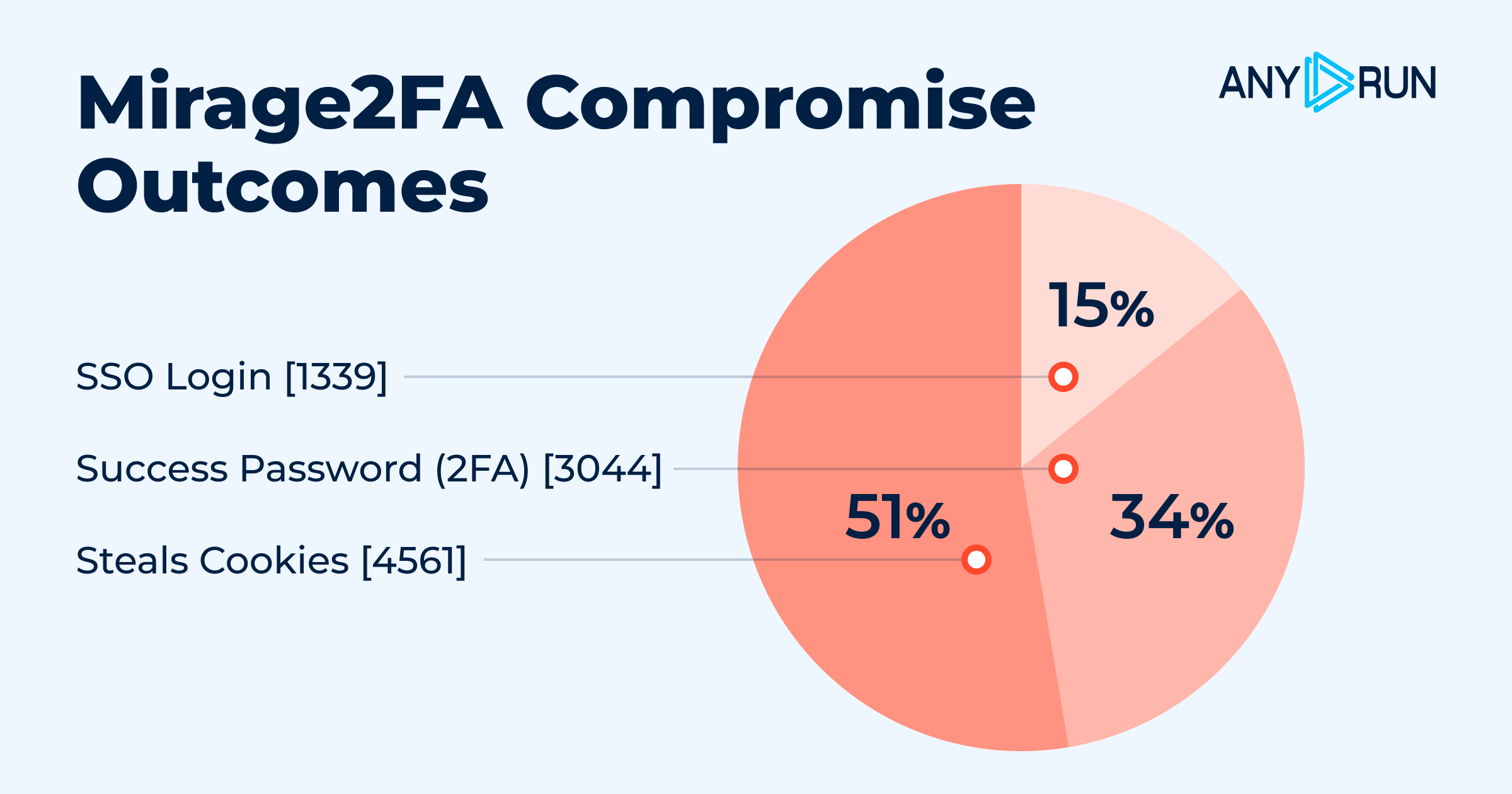
- Session Theft Leads Compromises: Of 9,332 potential compromise events, 4,561 involved cookie theft, compared with 3,044 password/2FA events and 1,339 SSO logins.
- Browser-Based Attack Chain: Mirage2FA avoids traditional binaries, using .htm, .xhtml, and .svg stagers, QR codes, obfuscated JavaScript, and WebSockets to conduct attacks inside the browser.
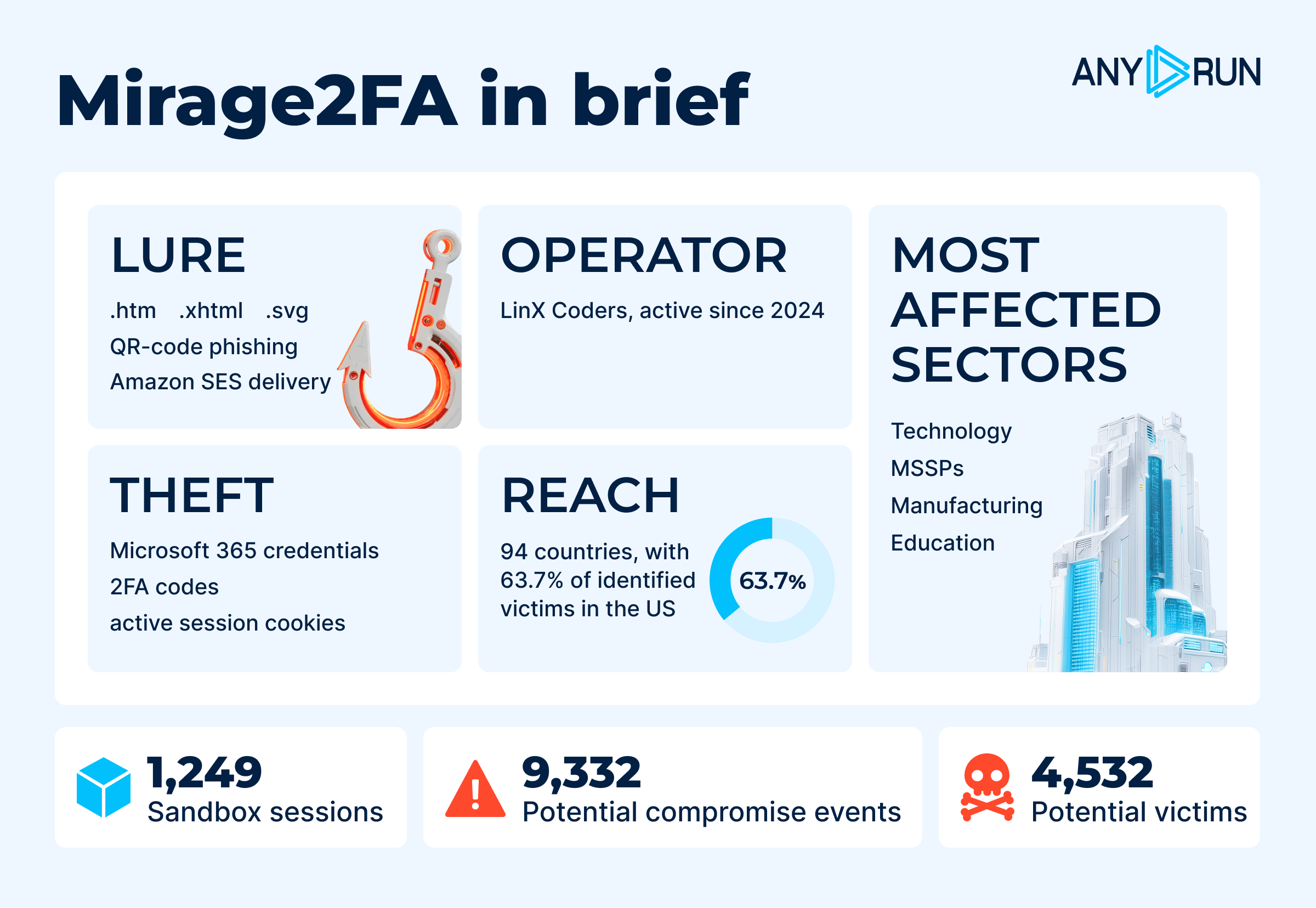
- ANY.RUN’s Interactive Sandbox analysis confirms that Mirage2FA uses an AiTM flow to intercept Microsoft 365 authentication in real time, capturing credentials, 2FA codes, and authenticated session cookies for account takeover.
- Mobile Exposure: 33.3% of successful login events involved mobile devices, where limited URL visibility can make phishing harder to spot.
- Persistent Hunting Opportunities: Despite changing infrastructure, recurring /xls/.js loader paths and LINX markers provide useful detection signals beyond individual domains and IPs.
What is Mirage2FA?
Mirage2FA is a commercial Phishing-as-a-Service (PhaaS) offering designed to compromise corporate Microsoft 365 accounts and active authenticated sessions while bypassing conventional two-factor authentication.
The operator distributes malicious HTML, XHTML, and SVG attachments that execute in the victim’s browser and silently fetch harvesting logic from attacker-controlled infrastructure. Mirage2FA then proxies the Microsoft 365 login and 2FA flow in real time through an Adversary-in-the-Middle (AiTM) attack, capturing credentials, authentication codes, and session cookies.
Unlike traditional credential-stealing phishing, Mirage2FA focuses on session hijacking. Stolen session cookies can potentially allow attackers to access Microsoft 365 and connected cloud services as an already authenticated user, even after the victim has successfully completed MFA.
The toolkit also relies on browser-based delivery rather than conventional executable malware. JavaScript obfuscation, WebSocket communication, browser fingerprinting, and rotating infrastructure help operators evade detection and adapt campaigns.
How Mirage2FA Threatens Businesses and Organizations
A successful Mirage2FA infection can create risks beyond the initial account compromise:
- Identity-driven access risk: Stolen sessions can provide trusted access to Microsoft 365 and connected cloud services.
- Fraud and impersonation exposure: Compromised accounts can be used to impersonate employees and target customers, suppliers, or finance teams.
- Higher containment costs: Session theft may require more than a password reset, increasing investigation and remediation efforts.
- Greater blast radius: A single compromised identity can enable follow-on access across email, SSO-connected applications, and internal workflows.
- MFA control gaps: Successful AiTM attacks demonstrate that conventional MFA can be intercepted, highlighting the need for stronger phishing-resistant authentication and session controls.
Victimology: Who Is Most Vulnerable?
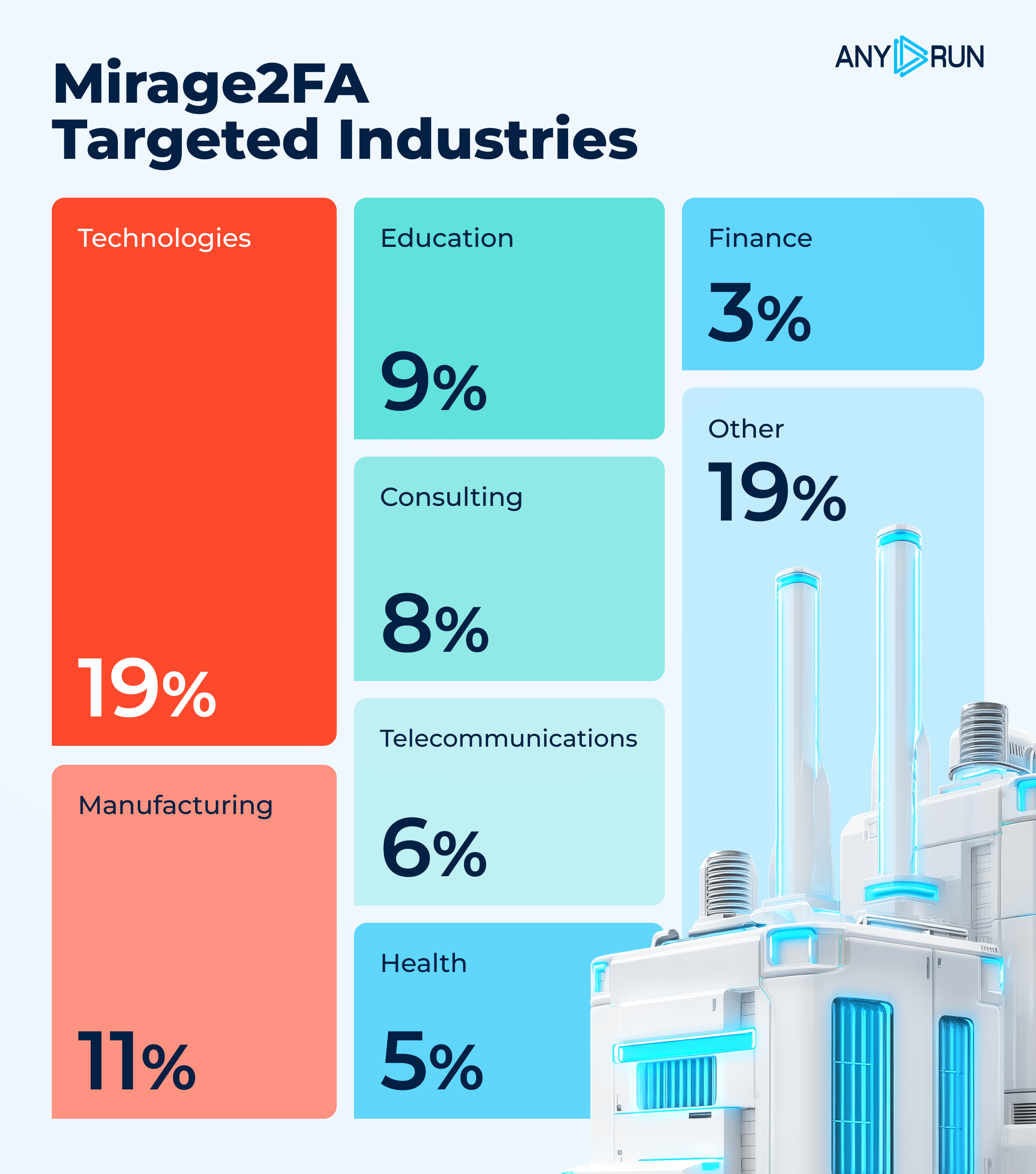
Mirage2FA primarily targets organizations that rely heavily on Microsoft 365 for communication, collaboration, and business operations. ANY.RUN telemetry shows the highest exposure in Technology (19.2%), followed by Manufacturing (11.1%), Education (9.9%), Consulting (8.3%), and Telecommunications (6.6%). These sectors provide attackers with access to valuable corporate data, trusted communications, and connected cloud services.
The campaign is strongly concentrated in the United States, which accounts for 2,885 victims (63.7%), while activity was recorded across 94 countries, including India, Singapore, the UK, Canada, Saudi Arabia, and South Africa.
Mirage2FA also showed sustained activity as the campaign progressed. By the end of data collection in July 2026, 445 Mirage2FA sandbox sessions had already been recorded that month, indicating continued operational activity and growing visibility in the wild.
The compromise data highlights the toolkit’s focus on authenticated session theft. Of 9,332 potential compromise events, 4,561 involved session cookie theft, compared with 3,044 password/2FA compromises and 1,339 SSO logins. Mobile devices accounted for 33.3% of successful login events, adding another layer of risk as phishing pages can be harder to scrutinize on smaller screens.
Overall, the data points to a threat focused on high-value corporate identities, where compromising a single Microsoft 365 session can provide attackers with a pathway to broader business access.
How Does Mirage2FA Function?
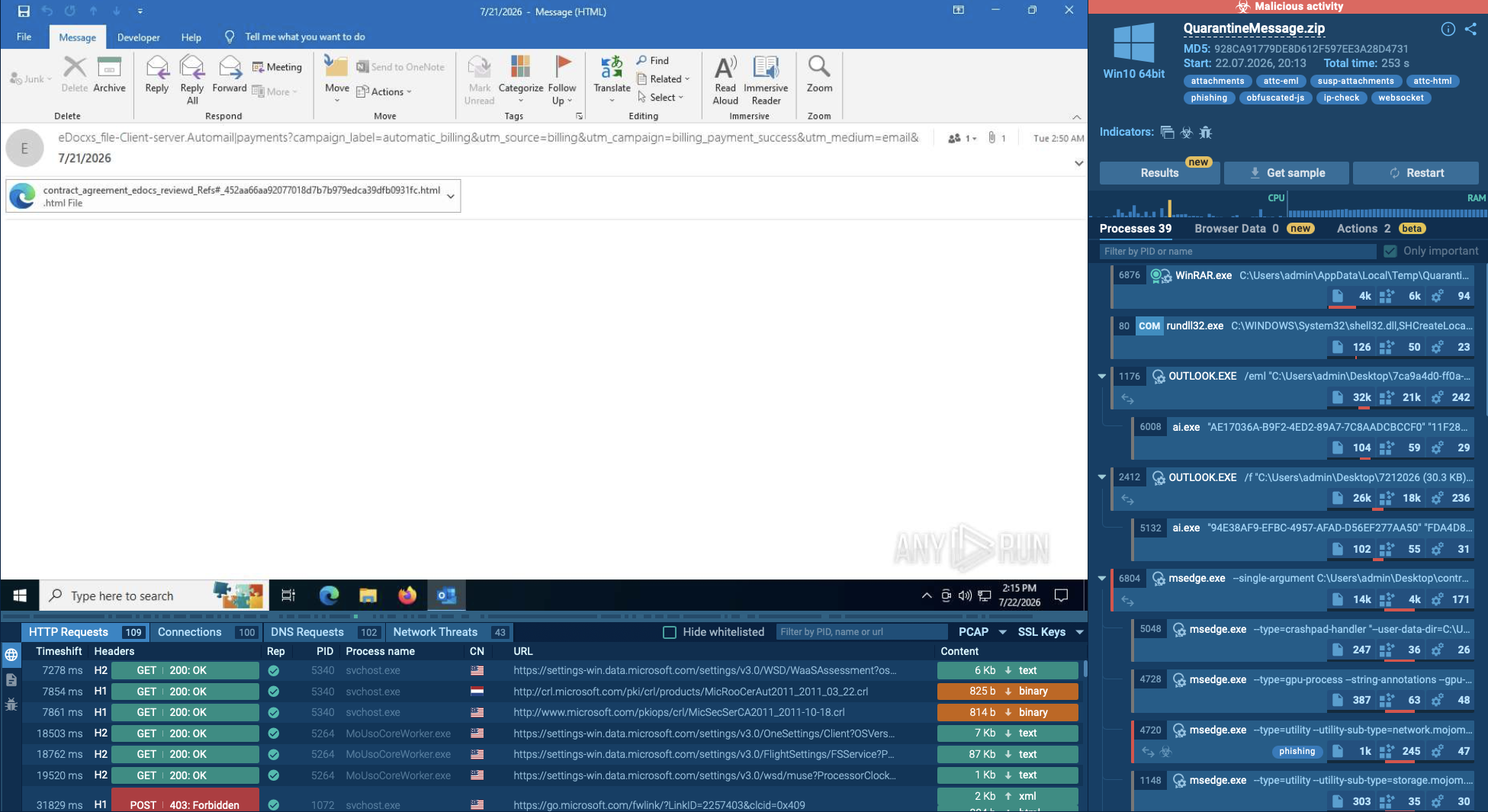
Observing a Mirage 2FA sample inside ANY.RUN’s Interactive Sandbox reveals how the threat moves from a phishing attachment to Microsoft 365 account takeover through browser-based AiTM activity.
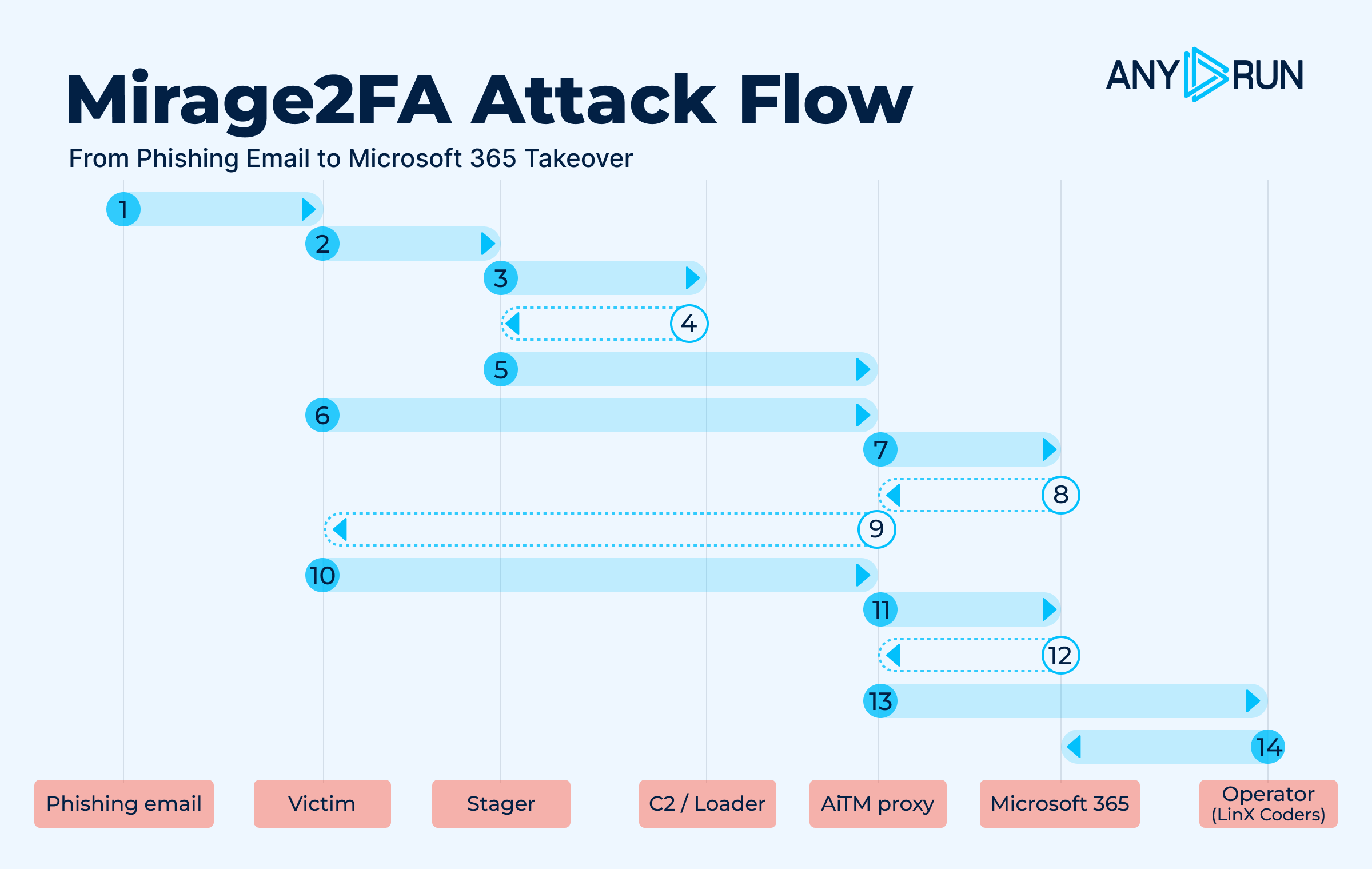
Stage 1: Delivery
A phishing email delivers a malicious .htm, .xhtml, or .svg attachment , or directs the victim to a QR-code link. Campaigns have also used Amazon SES for distribution.
Stage 2: Browser Execution
Opening the attachment launches an embedded stager. The files contain no traditional binary malware and instead execute JavaScript in the browser.
Stage 3: Hidden Staging
The stager uses HTML smuggling, SVG scripts, or JavaScript obfuscation to conceal its logic. It also carries a recipient-specific token, often based on the victim's email address.
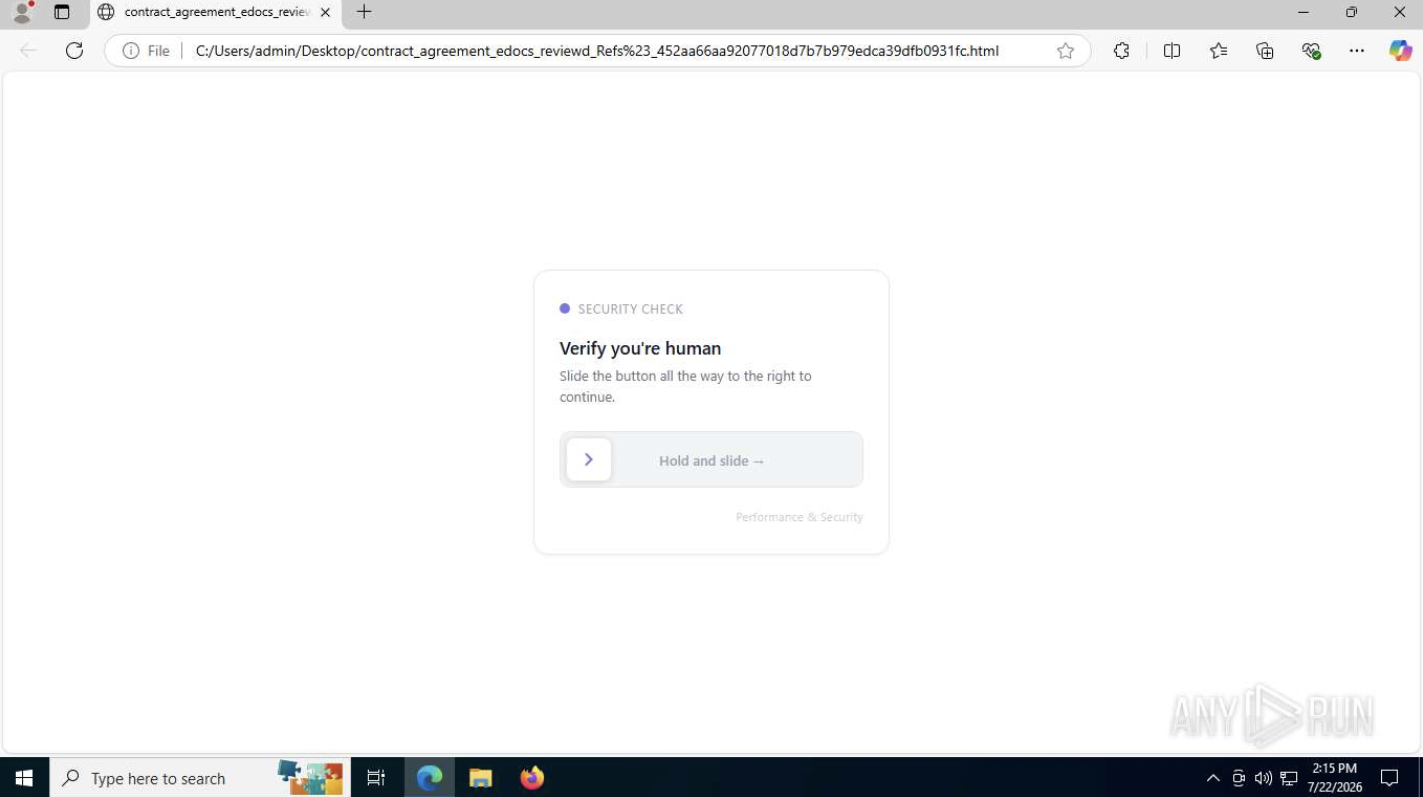
Stage 4: Remote Loader
The stager retrieves the harvesting code from an attacker-controlled server, typically through the /xls/.js URL pattern.
Stage 5: AiTM Authentication
The victim is shown a convincing Microsoft 365 login page backed by an Adversary-in-the-Middle reverse proxy. The victim enters their credentials and 2FA code.
Stage 6: Credential and 2FA Interception
The phishing page captures the victim’s username, password, and one-time 2FA code.
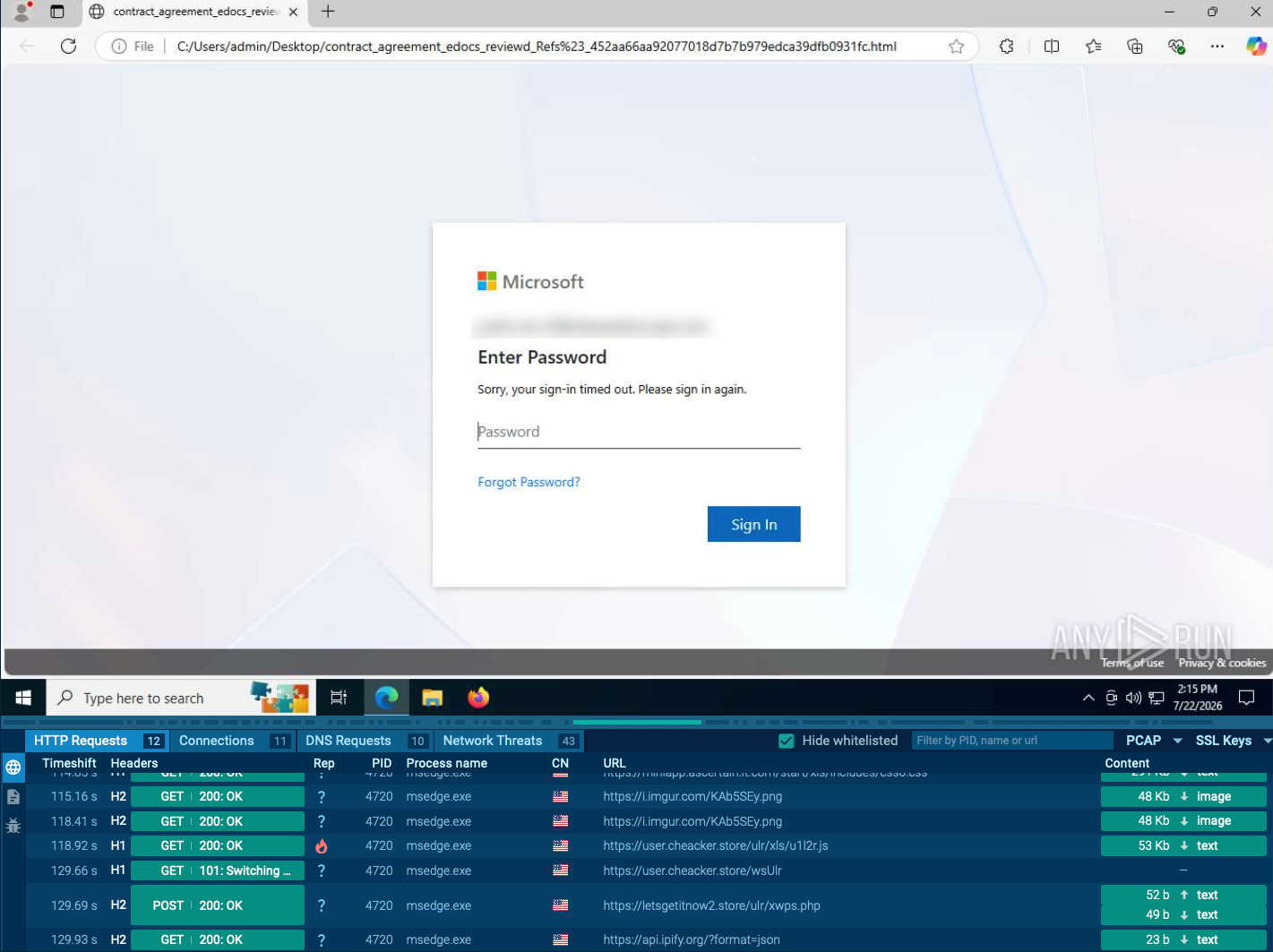
Stage 7: Real-Time Relay
Mirage2FA relays the authentication to legitimate Microsoft 365 services over a WebSocket channel, allowing the attacker to obtain the resulting authenticated session despite MFA.
Stage 8: Session Theft
The toolkit exfiltrates session cookies and credentials to the operator infrastructure, storing stolen cookies as Base64-encoded .txt dumps.
Stage 9: Account Takeover
Attackers can reuse the stolen session to access Microsoft 365, read email, and impersonate the victim without entering the password or completing MFA again.
The stagers use several concealment techniques: XHTML variants can dynamically create full-screen iframes or hide logic behind hex decoders, .htm samples use remote-loader stubs or XOR + Base64 + eval, and SVG samples use inline scripts or obfuscator.io-style wrappers to hide redirects.
This browser-based design makes Mirage2FA particularly difficult to detect with traditional malware controls, as the attack relies on legitimate browser functionality rather than deploying an executable payload.
The Evolution of Mirage2FA
Since its emergence in 2024, Mirage2FA has continuously adapted its delivery and evasion techniques while preserving infrastructure and code patterns that help researchers track the operation.
- Evolving identifiers: Early samples used LINXCODERSEMAIL, later shifting to LINXEMAIL and LINXB64EMAIL, with newer variants introducing markers such as #LINXMASKEMAIL, #LINXRANDSTRING, and linxz.
- More sophisticated obfuscation: The JavaScript loaders progressed from relatively simple code to XOR/Base64 encoding, hexadecimal decoders, and obfuscator.io-style _0x wrappers. Obfuscation was particularly prevalent in .htm files, affecting 453 of 629 samples.
- Expanded delivery channels: Mirage2FA moved beyond malicious .htm, .xhtml, and .svg attachments, incorporating QR-code phishing and Amazon SES. Social-engineering themes have repeatedly included HR communications and 401(k) benefits.
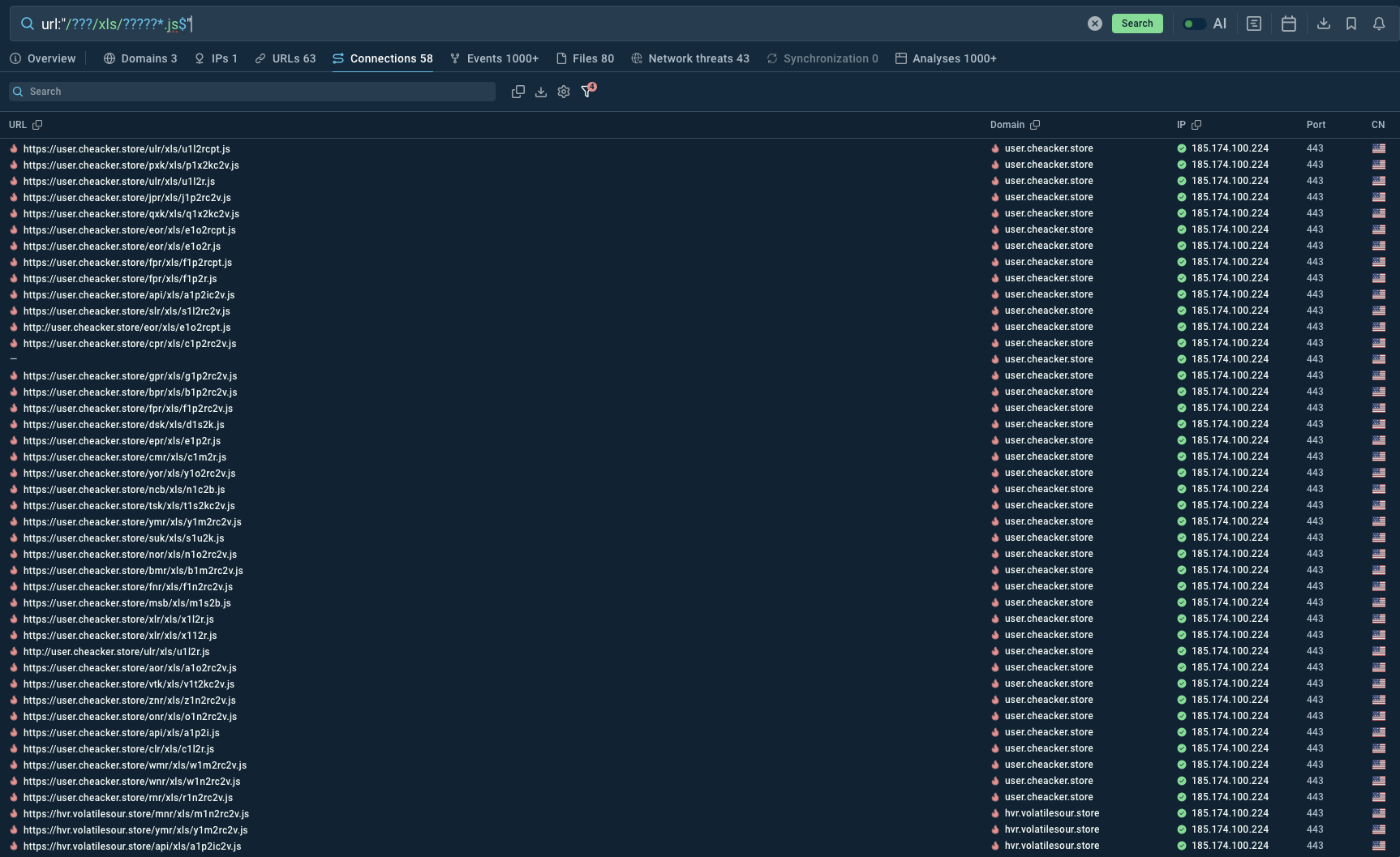
- Rotating C2 infrastructure: Although domains and tokens change, the toolkit continues to expose recurring /xls/*.js loader paths, including variations built around short routing codes and unique tokens. These persistent patterns give defenders a way to identify related activity even as infrastructure rotates.
How Businesses Can Use ANY.RUN’s Threat Intelligence Against Mirage2FA
Mirage2FA rotates domains and infrastructure, making static IOCs easy to outlive. ANY.RUN’s Threat Intelligence helps SOC teams combine known indicators with recurring behavioral patterns to detect and investigate the threat.
Threat Intelligence Lookup helps analysts uncover the broader campaign behind a single suspicious artifact.
Detect Beyond Static IOCs
Hunt for Mirage2FA patterns across email, proxy, EDR, DNS, and browser telemetry, including:
- /<3char>/xls/*.js loader paths
- Base64-encoded email addresses used as DNS subdomains
- LINX* placeholder strings
- Suspicious .htm, .xhtml, and .svg attachments
- WebSocket connections to unknown hosts following JavaScript execution
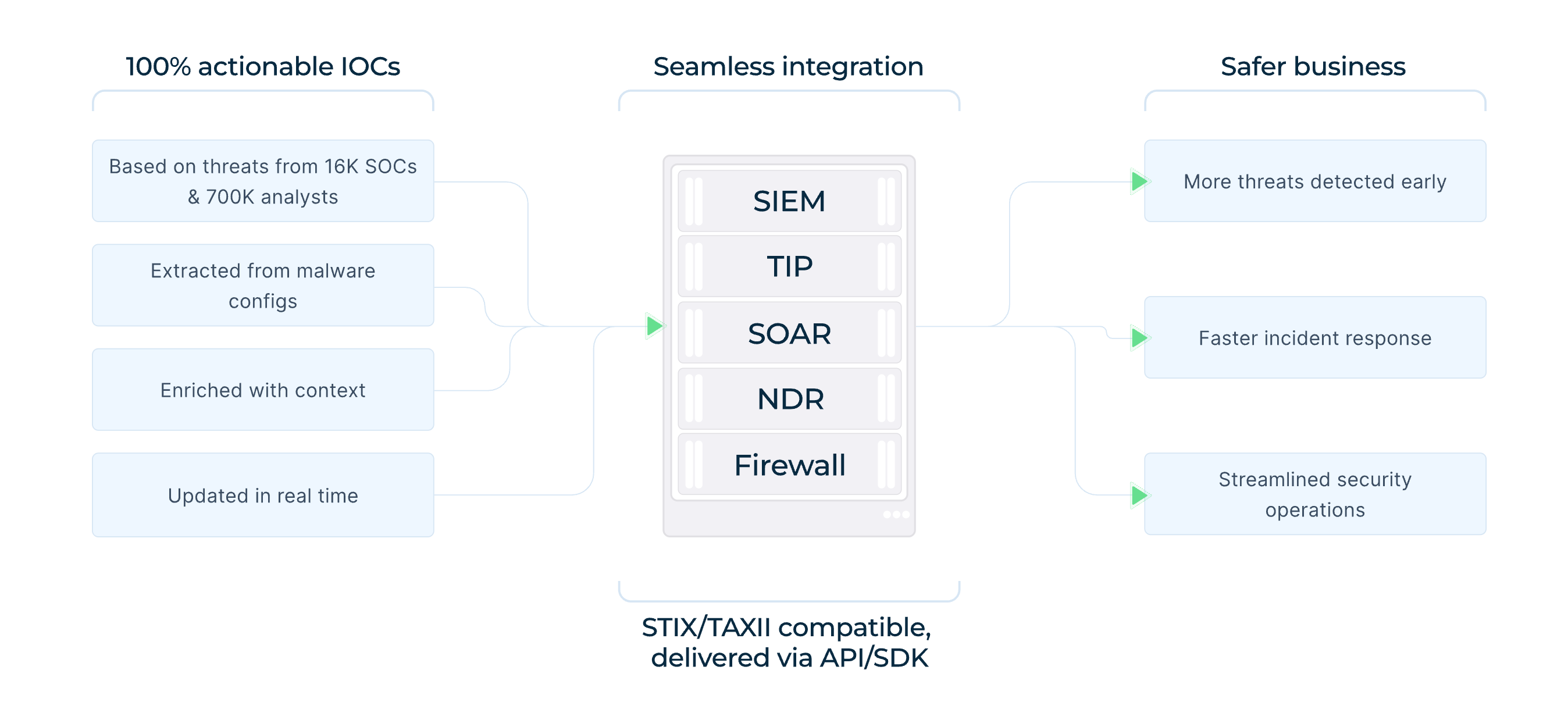
Fresh ANY.RUN’s Threat Intelligence Feeds built from data contributed by 16,000 organizations and 700,000 security professionals, can deliver known malicious infrastructure to SIEM, SOAR, and EDR platforms, as well as other security controls. Behavioral detections help maintain coverage as Mirage2FA changes its domains and paths.
Connect Individual Samples to the Wider Campaign
Analysts can use ANY.RUN’s Threat Intelligence Lookup to pivot from suspicious URLs, domains, IPs, or loader patterns to related samples, infrastructure, and previous sandbox activity.
For Mirage2FA, the characteristic loader pattern can be used as a starting point: url:"/???/xls/?????*.js$"
This type of infrastructure pivot helped researchers expand individual Mirage2FA samples into a broader campaign cluster.
Respond to Session Theft
If investigation confirms that Mirage2FA has stolen a Microsoft 365 session cookie, password rotation alone is insufficient. Response teams should revoke active sessions and tokens, review mail-forwarding rules and OAuth grants, and investigate activity performed through the compromised account.
Combining behavioral hunting, fresh threat intelligence, and sandbox-based investigation gives SOC teams a more complete way to detect Mirage2FA and contain compromised identities.
Conclusion
Mirage2FA demonstrates how phishing has evolved from simple credential theft into session-based identity compromise. By intercepting Microsoft 365 authentication and stealing active session cookies, it can bypass conventional MFA and provide attackers with trusted access.
Reducing the risk requires a combination of phishing-resistant MFA, behavioral detection, isolated analysis, threat intelligence, and session-focused incident response. The faster defenders identify the campaign and revoke stolen access, the smaller the potential impact.
Frequently Asked Questions: Mirage2FA
1. What is Mirage2FA?
Mirage2FA is a Phishing-as-a-Service (PhaaS) toolkit designed to compromise corporate Microsoft 365 accounts. It uses Adversary-in-the-Middle (AiTM) phishing to capture credentials, 2FA codes, and authenticated session cookies.
2. How does Mirage2FA bypass MFA?
Mirage2FA proxies the Microsoft 365 authentication process in real time. When a victim enters their password and completes 2FA, the toolkit relays the authentication to the legitimate service while capturing the resulting authenticated session cookie, allowing attackers to potentially reuse the session without another MFA prompt.
3. How does Mirage2FA get delivered?
The toolkit commonly arrives through malicious .htm, .xhtml, and .svg attachments that execute in the browser and retrieve JavaScript from attacker-controlled infrastructure. Campaigns have also used QR-code lures and email distribution services such as Amazon SES.
4. How can organizations use interactive sandboxing and threat intelligence to detect Mirage2FA?
Interactive sandboxing allows analysts to observe the complete attack chain in real time, including JavaScript execution, redirects, fingerprinting, remote loaders, WebSocket communication, and fake Microsoft 365 authentication pages. Proactive threat intelligence can then help pivot from suspicious URLs, domains, IPs, or loader patterns to related infrastructure and activity.
5. What are the key indicators of a Mirage 2FA activity?
Security teams should look beyond static domains and IP addresses and hunt for recurring behavioral indicators, including /xls/*.js
LINX* markers, Base64-encoded email addresses in DNS subdomains, suspicious browser-executed attachments, and WebSocket connections to unknown hosts following JavaScript execution.
Other malware & phishing threats
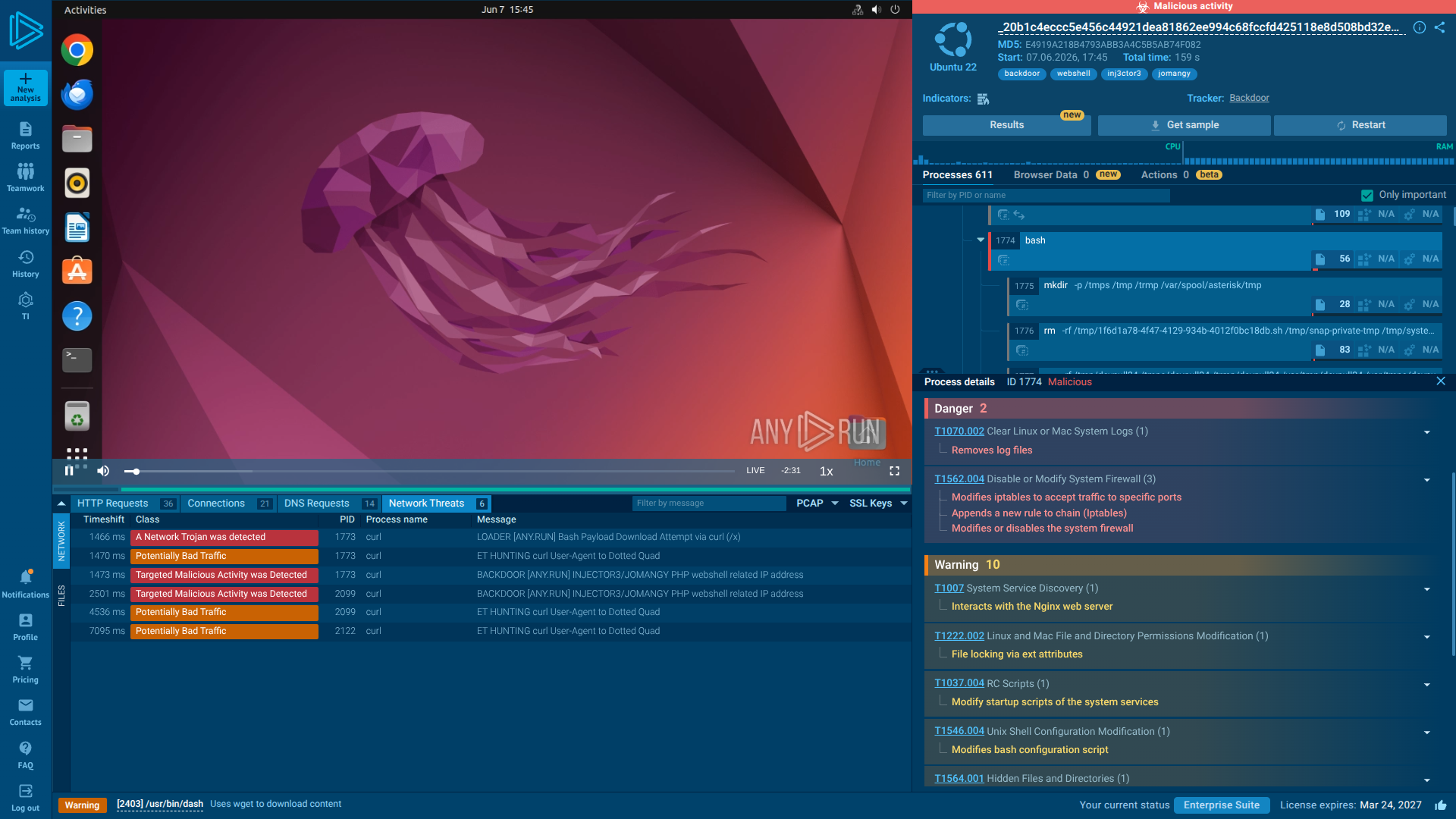 JOMANGYJOMANGY is a PHP webshell and backdoor family targeting vulnerable FreePBX servers. It is designed to establish long-term access to compromised VoIP infrastructure, enable toll fraud, and survive remediation attempts through multiple self-reinforcing persistence mechanisms. Unlike many traditional webshells, JOMANGY employs a highly resilient architecture that can automatically restore itself even after partial removal.
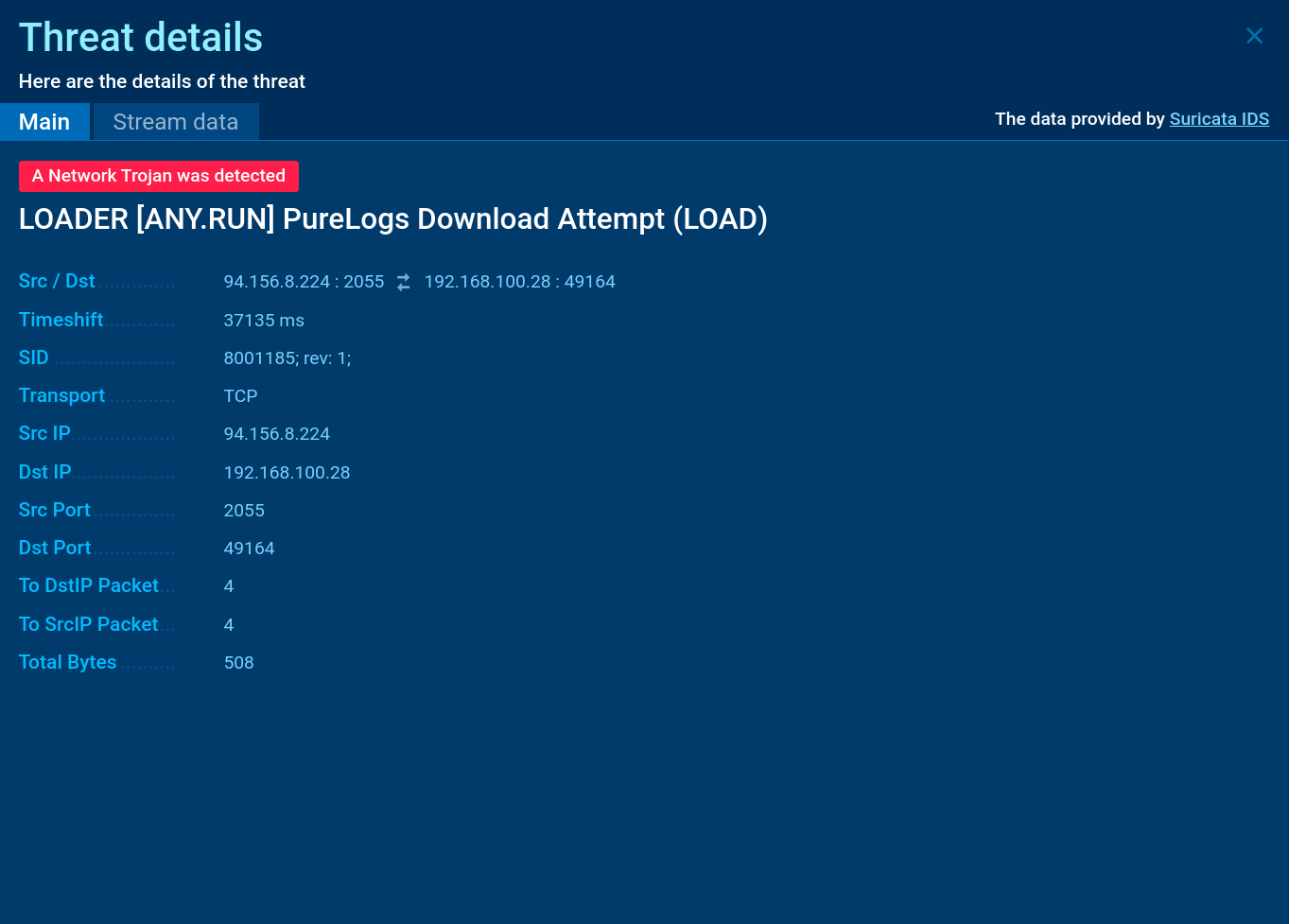 PureLogsPureLogs is a stealer that collects a wide range of data from infected systems, including browser data, crypto wallets, PC configuration details, etc. It is delivered by PureCrypter, another malware that belongs to the Pure malware family. PureLogs is distributed based on a subscription model, allowing any threat actor to utilize it in their attacks.
 BQTLockBQTLock is a ransomware-as-a-service (RaaS) malware family that emerged in 2025 and quickly gained attention due to its combination of file encryption, credential theft, and data exfiltration. BQTLock encrypts files using a hybrid AES-256 and RSA-4096 encryption scheme, demands payment in Monero cryptocurrency, and performs data theft and system reconnaissance.
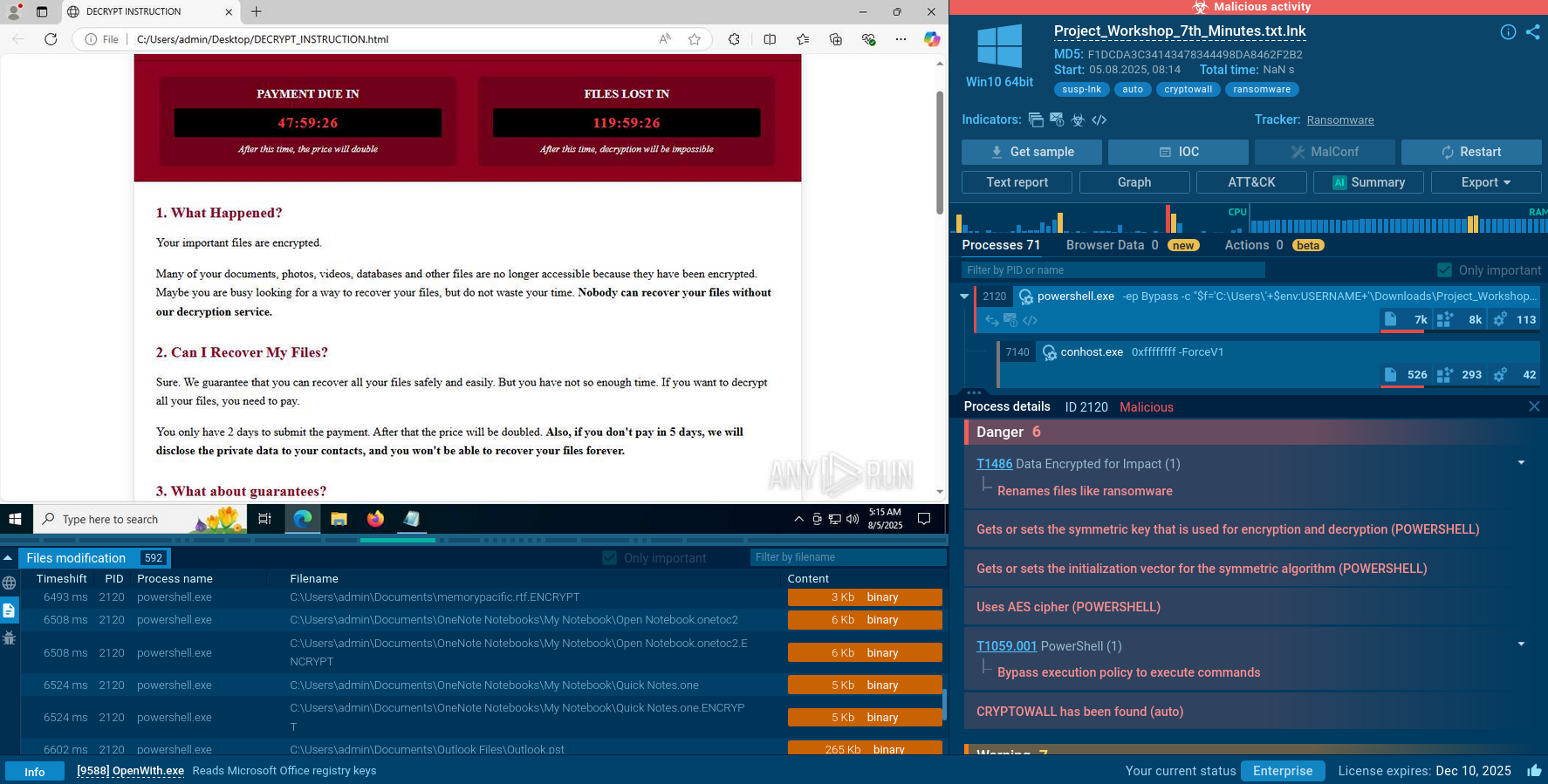 CryptoWallCryptoWall is a notorious ransomware family that emerged in early 2014 and rapidly became one of the most destructive cyber threats of its time. This malware encrypts victims' files using strong AES encryption, demands ransom payments in Bitcoin, and has generated hundreds of millions of dollars for cybercriminals.
 AzorultAZORult can steal banking information, including passwords and credit card details, as well as cryptocurrency. This constantly updated information stealer malware should not be taken lightly, as it continues to be an active threat.
 CastleLoaderCastleLoader is a modern malware loader designed to quietly establish initial access and deliver follow-up payloads such as stealers, RATs, and ransomware. It focuses on stealth, flexibility, and rapid payload rotation, making it an effective tool for financially motivated threat actors and a persistent problem for enterprise defenders.